
Is Anyword worth paying for in 2026? This Anyword review gives you the short answer first, then the details.
We cover what it costs, what its predictive score really does, and where the plan limits catch buyers out.
Anyword is an AI copywriting platform for marketers. It writes ads, email subject lines, and landing page copy, and scores each version before you publish it.
Table of Contents
Anyword Review: Is It Worth It for Email Copy?
- Worth it if you write email subject lines or ads and want a score to pick which version to test first.
- Skip it if you need a long-form blog writer or an email platform. Anyword writes and scores copy. It does not send email.
- The real limit is predictions, not words. Starter includes 50 per month.
- No free plan. You get a 7-day trial capped at 2,500 words.
What Is Anyword?
Anyword generates marketing copy from a prompt or template. Its defining feature is the Predictive Performance Score, a 0 to 100 rating attached to each version.
It targets performance marketers: people who run A/B tests on ads, email subject lines, and landing pages.
Anyword Pricing in 2026
Anyword has four plans: Starter, Data-Driven, Business, and Enterprise. Business and Enterprise are custom-quoted.
| Plan | Monthly billing | Billed annually (per month) | Seats | Predictions per month | Aimed at |
|---|---|---|---|---|---|
| Starter | $49 | $39 | 1 | 50 | Solo marketers and freelancers |
| Data-Driven | $99 | $79 | 3 | 100 | Small marketing teams |
| Business | Custom | Custom | Custom | 250 | Larger teams |
| Enterprise | Custom | Custom | Custom | 500+ | Private model and SSO needs |

Four Pricing Catches
- Predictions are the meter. Word generation is unlimited. Scoring 10 assets with 5 versions each uses all 50 Starter predictions.
- Extra seats cost more. Data-Driven includes three seats. Each extra seat is reported at about $59 per month, up to ten.
- The trial is thin. Seven days and 2,500 words is enough to try the score, not to run a real test.
- Real-time scoring costs more. Most sources list predictions while you edit on Data-Driven, not Starter.
Anyword’s Predictive Performance Score
The score estimates how well a version will perform, based on a model Anyword says is trained on large amounts of ad and conversion data.
Anyword claims roughly 82% prediction accuracy. We found no independent test that confirms it.

Treat the score as a way to rank versions before an A/B test, not as a guarantee of results.
Anyword Features for Email Marketing
- Email subject line and body copy generation
- 100+ templates and a blog post wizard with a plagiarism checker
- Brand voice settings, with one voice on Starter and Data-Driven and more on Business
- A Chrome extension that brings Anyword into tools such as Google Docs and HubSpot
- Support for 30+ languages
How to Use Anyword for an Email Subject Line Test
- Write the brief. Describe the offer, the audience, and the tone.
- Generate five subject lines and read their scores.
- Keep the top two and drop the rest.
- Run an A/B test in your email platform on a small part of your list.
- Send the winner to the rest and note the result for next time.
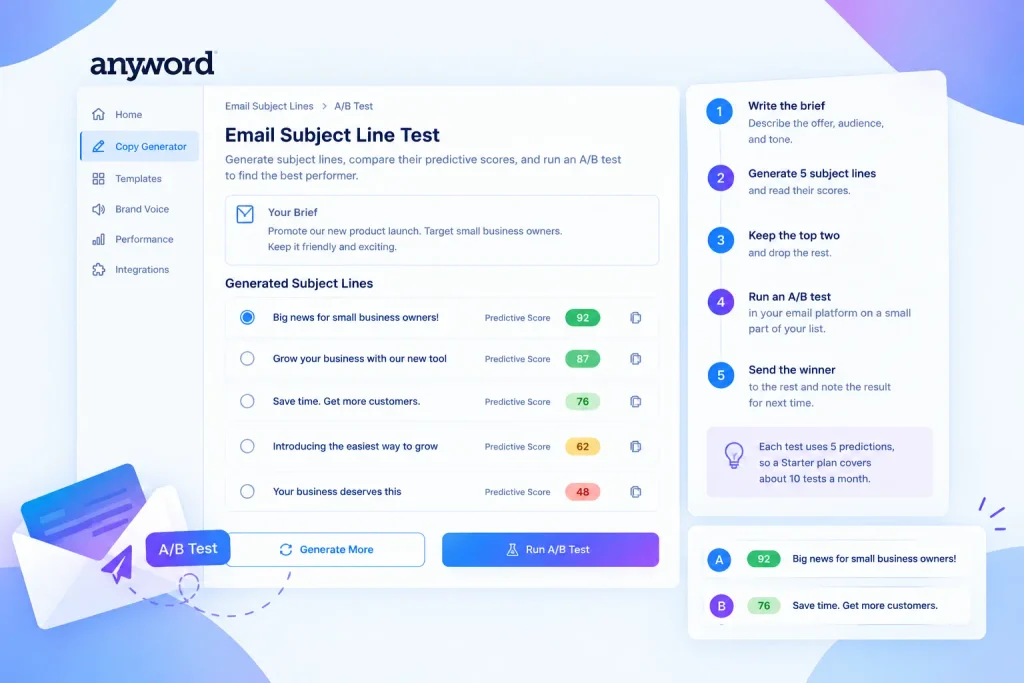
This uses five predictions per test, so a Starter plan covers about ten tests a month.
Anyword Pros and Cons
Pros
- A score on every version, which speeds up choosing what to test.
- Unlimited word generation on every paid plan.
- Strong for short copy such as subject lines and ad text.
- Brand voice controls keep copy consistent across channels.
- High user ratings on review sites.
Cons
- Low prediction caps make Starter feel tight for frequent testing.
- Narrow focus. One reviewer says long-form blog output can read as robotic.
- Price. Solo users on G2 compare Starter’s $49 to cheaper general AI writers.
- Seats add cost on Data-Driven.
- Paid only, with no free plan.
What Users Say in Anyword Reviews
As of mid-2026, Anyword scores about 4.8/5 on G2 (roughly 1,200 reviews) and 4.8/5 on Capterra (roughly 390 reviews).
Across the public ratings, reviewers praise the predictive score and the clean interface. The most common complaints are price for solo users and the prediction caps.
Who Should Use Anyword?
- A freelancer testing email subject lines: Starter covers a small test each month.
- A three-person marketing team running ads and email: Data-Driven, since it is the first plan with three seats.
- Teams that already run A/B tests and want to cut the number of weak versions.
Who Should Skip Anyword?
- Anyone who needs a long-form SEO writer. See our Jasper AI review.
- Anyone who needs to send email. You still need an email platform.
- Small budgets. There is no free plan.
- Teams with no testing habit. The score is only useful if you act on it.
Anyword Alternatives
- Jasper: stronger for long-form content and brand workflows.
- Copy.ai: a general AI writer with workflow automation.
- Writesonic: a lower-cost general writer with many templates.
See our top AI email marketing tools comparison for email platforms.
How to Choose an Anyword Plan
After this Anyword review, use these steps to pick a plan.
- Count the versions you score each month. More than 50 means Data-Driven.
- Count your users. More than one login means Data-Driven.
- Decide if you need scoring while you edit. If yes, plan on Data-Driven.
- Use the trial on one real subject line test before you commit.
Frequently Asked Questions
Which email platform should I use with Anyword?
Any platform works, because you paste Anyword’s copy into it. See our ActiveCampaign review for automation-heavy needs, or our top tools list for simpler options.
Is annual billing cheaper?
Yes. Annual billing saves about 20%: $10 per month on Starter and $20 per month on Data-Driven.
How many predictions do I need?
Multiply the assets you test each month by the versions of each. If the result is above 50, Starter will run out.
Anyword Review: Final Verdict
Our Anyword review verdict: it is a focused tool for marketers who test short copy. For general writing or email sending, other tools fit better.
Use the trial on one real test before you commit.