
Writing a newsletter sounds easy until it’s time to write one yourself. You sit down with a topic in mind, open a blank document, and then spend the next hour trying to figure out how to begin. The first sentence doesn’t feel right, the subject line sounds boring, and before you know it, you’ve spent more time thinking than writing.
That’s one of the reasons AI Newsletter Generators have become so popular over the last few years. They don’t replace your ideas or your voice. Instead, they give you a starting point. Rather than staring at an empty page, you have a draft to work with, edit, and shape into something that feels like your own.
That simple change can save a surprising amount of time. Whether you’re sending a weekly newsletter, promoting a new product, or sharing company updates, getting the first draft finished is often the biggest hurdle. Once that’s done, editing and adding your personal touch becomes much easier.
Of course, not every AI newsletter tool delivers the same quality. Some create generic emails that sound like they were copied from a template. Others are much better at understanding tone, generating fresh ideas, and helping you write emails that people actually want to open.
In this guide, we’ll look at how an AI Newsletter Generator works, why so many businesses are using one, the features that really matter, and which tools are worth your time. By the end, you’ll have a much clearer idea of whether an AI newsletter generator is the right fit for your workflow-and how to get the best results if you decide to use one.
Table of Contents
What Is an AI Newsletter Generator?
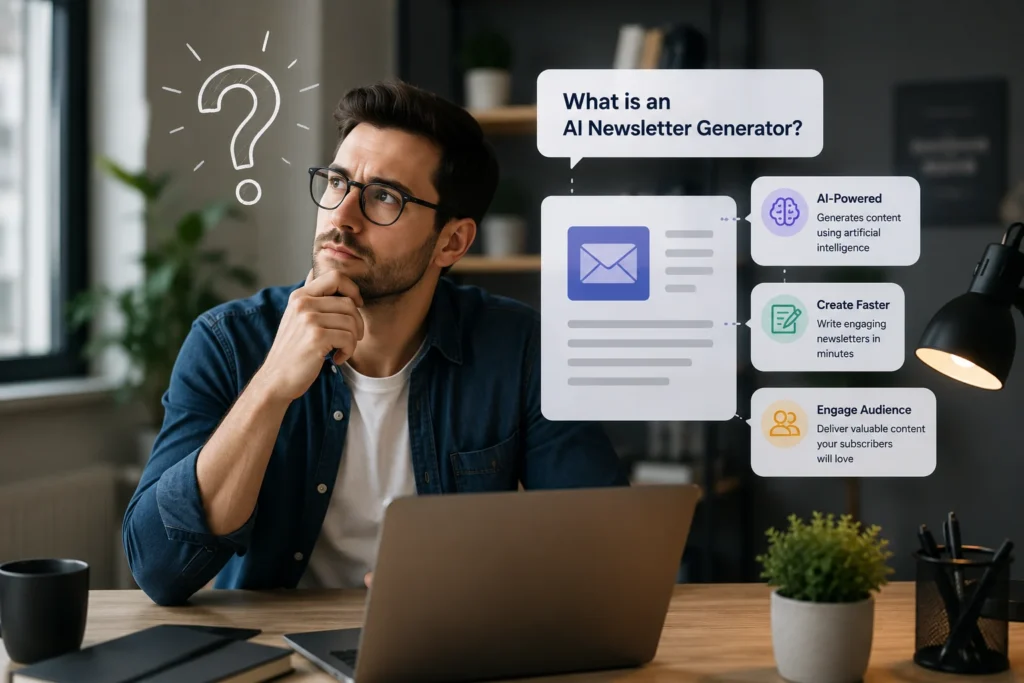
At its core, an AI Newsletter Generator is a writing tool designed to help you create email newsletters more quickly. Instead of writing every sentence yourself, you give the AI a prompt-such as the topic, audience, or goal of the email-and it generates a draft for you.
For example, imagine you’re launching a new product. Normally, you’d have to think of an attention-grabbing subject line, write an introduction, explain the product’s benefits, and finish with a strong call to action. An AI newsletter generator can produce that first version in minutes, giving you something to improve instead of starting from scratch.
Most modern tools can also adjust the tone of the email. If you want something friendly and conversational, they can do that. If you need a more professional message for business clients, they can adapt the writing style as well. Some tools even remember your preferred tone so your newsletters stay consistent over time.
It’s important to understand, though, that AI works best as an assistant rather than a replacement. The strongest newsletters still include your ideas, your experience, and your understanding of your audience. AI simply handles much of the heavy lifting, making the writing process faster and a lot less frustrating.
That’s why businesses of every size-from solo creators to large marketing teams—are adding AI to their email workflow. Many of them also rely on AI email marketing tools to automate campaigns, improve personalization, and create better-performing emails.
Why More Businesses Are Using AI Newsletter Generators
Not long ago, creating a newsletter was a task that many businesses pushed to the end of the week. It wasn’t because email marketing wasn’t important. It was because writing a good email took time, and there was always something else that felt more urgent.
That’s starting to change.
An AI Newsletter Generator doesn’t just help you write faster. It makes the whole process feel less overwhelming. Instead of spending the first 30 minutes trying to figure out how to begin, you can focus on improving a draft that’s already in front of you.

Time is one of the biggest reasons people make the switch. A newsletter isn’t just a few paragraphs of text. You have to think of an interesting topic, write a subject line, organize your ideas, and make sure the email ends with a clear next step. Even experienced marketers can spend hours putting everything together. AI helps shorten that process without taking away your control over the final message.
Another reason is consistency. Many businesses start with good intentions. They promise to send a newsletter every week or every month, but after a while, the schedule becomes difficult to maintain. When creating each email takes several hours, it’s easy to fall behind. Having AI generate a first draft makes it much easier to stick to a regular publishing schedule.
Of course, creating the newsletter is only one part of a successful email marketing strategy. Consistently sending valuable emails and building relationships with subscribers is what drives long-term results.
There’s also the challenge of coming up with fresh ideas. If you’ve been sending newsletters for months, you’ve probably experienced that moment when every new topic feels too similar to the last one. AI can’t replace creativity, but it can suggest different angles, new subject lines, and content ideas you might not have considered on your own.
Personalization has improved as well. Modern AI tools can adjust the tone and structure of an email based on the audience you’re writing for. A welcome email for new subscribers shouldn’t sound the same as a product announcement or a weekly update. Instead of rewriting everything from scratch, AI helps you adapt your message while keeping your brand voice consistent.
Perhaps the biggest advantage isn’t speed or convenience. It’s the fact that AI removes the pressure of starting with a blank page. Once you have something to work with, writing becomes easier. You spend less time wondering what to say and more time making sure your message is clear, helpful, and worth reading.
That doesn’t mean every email should be published exactly as the AI writes it. The best results still come from combining AI with your own experience. Think of it as a writing partner, not a replacement. Let AI handle the first draft, then add the details, stories, and personality that only you can provide.
How Does an AI Newsletter Generator Work?
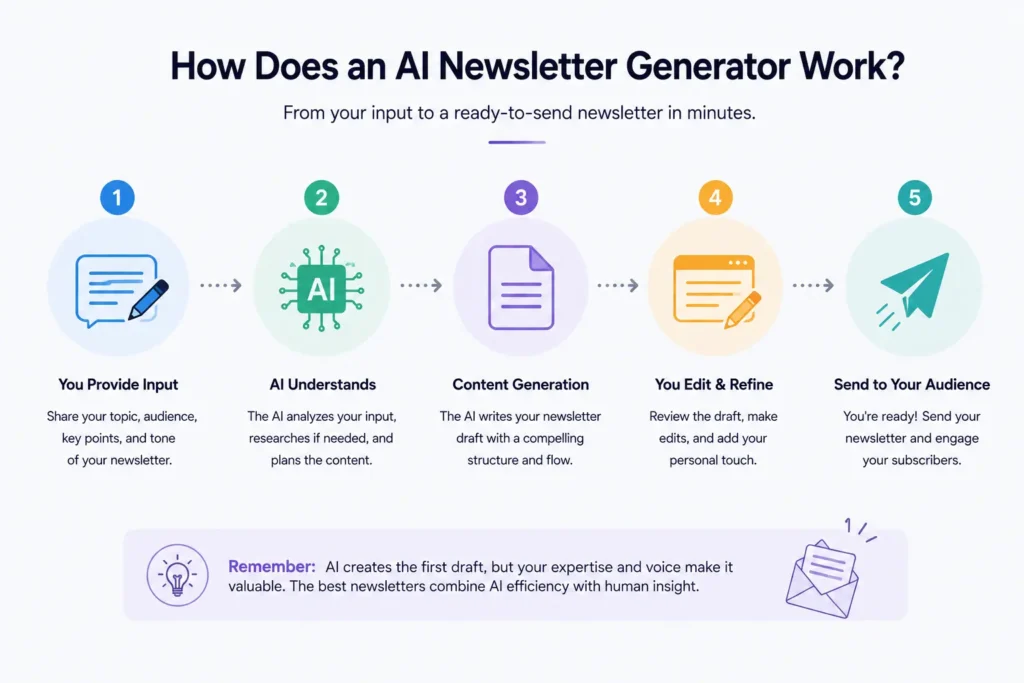
If you’ve never used an AI Newsletter Generator before, the process is probably much simpler than you think. You don’t need any technical skills, and you certainly don’t need to know how AI works behind the scenes. In most cases, it only takes a few minutes to create your first draft.
Let’s say you own an online clothing store and want to announce a weekend sale. Instead of opening a blank document, you open your AI tool and type something like:
“Write a friendly email announcing a 20% weekend sale on summer clothing. Keep the tone casual and end with a clear call to action.”
A few seconds later, the tool generates a complete draft. It usually includes a subject line, an opening paragraph, the main message, and a closing section encouraging readers to visit your store.
At this point, your job isn’t to copy and paste the email. It’s to make it yours.
You might replace a few generic phrases, mention a bestselling product, add your brand’s personality, or include a personal note for your subscribers. Those small edits often make the difference between an email that feels automated and one that feels genuinely written for your audience.
Most AI newsletter tools follow the same basic workflow:
- Define the Goal: Choose the topic or goal of your email.
- Set the Tone: Describe your audience and the tone you want.
- Generate: Let the AI generate a draft.
- Refine: Edit the content to match your brand.
- Enhance: Add images, links, or product recommendations.
- Review & Send: Preview the email and send it.
The whole process can take less than fifteen minutes, depending on how much you want to customize the final version.
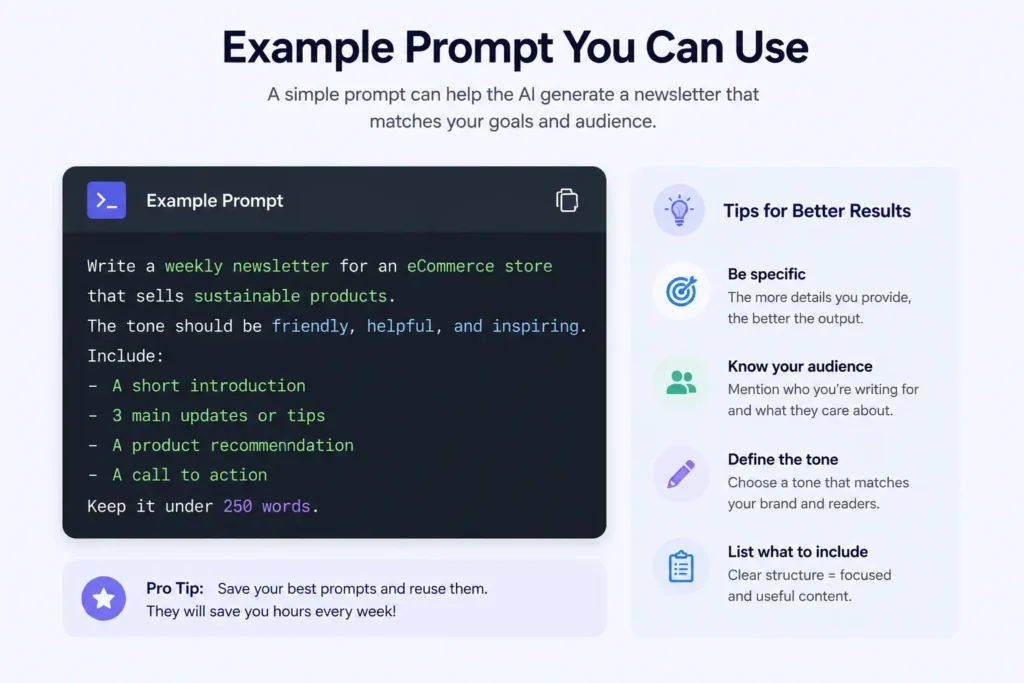
One thing that’s easy to overlook is the quality of your prompt. AI can only work with the information you give it. A simple request like “Write a newsletter about shoes“ will usually produce a generic result. But a more detailed prompt-such as “Write a newsletter for customers who bought running shoes in the last six months. Introduce our new lightweight collection, keep the tone friendly, and encourage early access before the public launch“-gives the AI much more context, which often leads to a stronger first draft.
The better your instructions, the less editing you’ll need afterward. That’s why experienced marketers don’t rely on AI to do all the thinking. They use it to speed up the writing process while staying in control of the final message.
Best AI Newsletter Generators in 2026
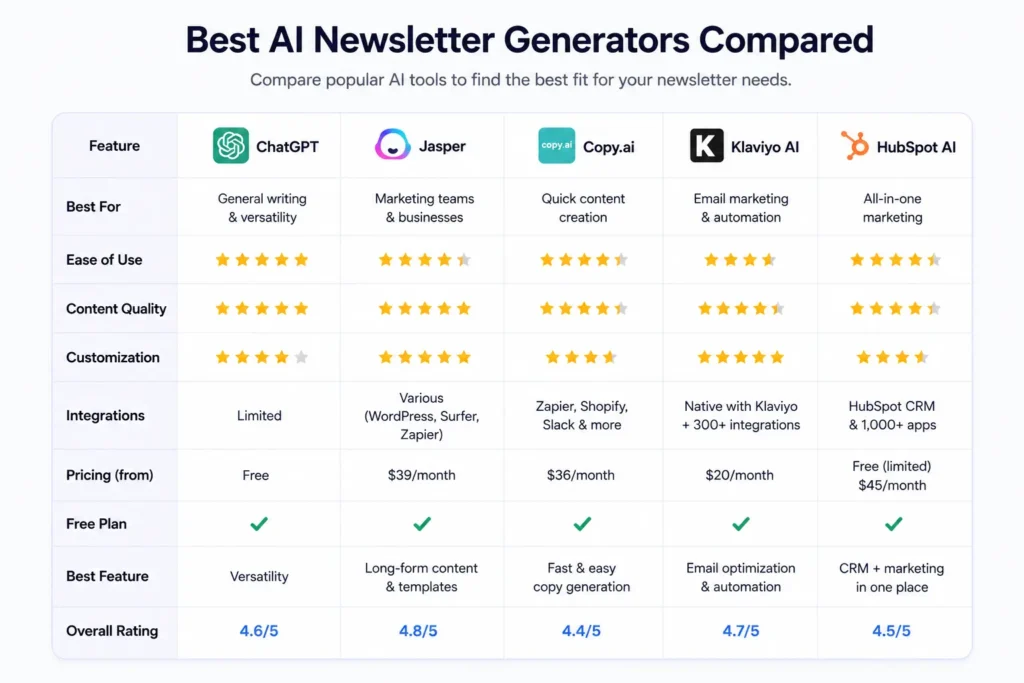
Choosing an AI Newsletter Generator is a little like choosing a laptop. There’s no single option that’s perfect for everyone. The best tool depends on how you work, how often you send emails, and what you expect AI to do for you.
If all you need is help writing better newsletters, one tool might be enough. But if you’re running an ecommerce store with automated email flows, your priorities will probably be very different. That’s why it’s worth thinking about your workflow before comparing features.
To make things easier, here’s a quick overview before we look at each tool in more detail.
| Tool | Best For | Free Plan | What Stands Out |
|---|---|---|---|
| ChatGPT | Writing newsletters, brainstorming, editing | ✅ | Natural writing and flexible prompts |
| Jasper | Marketing teams | ❌ | Strong brand voice features |
| Copy.ai | Quick drafts and ideas | ✅ | Fast content generation |
| Klaviyo AI | Ecommerce businesses | Limited | Built into Klaviyo’s email platform |
| HubSpot AI | Businesses using HubSpot | Limited | Connected to CRM and marketing tools |
Let’s take a closer look.
ChatGPT – The Best All-Around Writing Assistant
If someone asked me to recommend just one AI tool for writing newsletters, ChatGPT would probably be my first suggestion.
The reason is simple. It adapts to almost any situation.
One day you can use it to write a welcome email for new subscribers. The next day it can help announce a product launch, rewrite an old campaign, or come up with ten subject line ideas when nothing sounds right.
I also like that it doesn’t force you into a template. You decide what the email should sound like, who it’s for, and what action you want readers to take. The more context you give, the better the results usually are.
Here’s a simple example.
Imagine you’re running a small coffee brand. You’ve just introduced a new seasonal blend and want to tell your subscribers about it.
Instead of starting with an empty page, you could use a prompt like this:
“Write a friendly newsletter announcing our new autumn coffee blend. Mention that it’s available for a limited time, keep the email under 250 words, and finish with a warm call to action.”
Within a few seconds, you’ll have a draft that’s much easier to improve than writing everything yourself.
What I like
- Produces natural-sounding content.
- Excellent for brainstorming and rewriting.
- Works for almost any type of newsletter.
- Easy for beginners to learn.
Keep in mind
- It isn’t an email marketing platform.
- You’ll still need another tool to design and send your emails.
- The quality depends on the prompt you provide.
Jasper – Best for Teams That Need a Consistent Brand Voice
Jasper is a better fit for businesses that publish content regularly.
What makes it different is its focus on brand consistency. Once you teach Jasper how your company writes, it becomes much better at producing content that feels familiar across newsletters, blog posts, and social media.
That can save a surprising amount of editing time when several people are creating content for the same business.
For example, if your company always writes in a friendly, confident tone, Jasper tries to keep that style instead of producing something that sounds completely different every time.
The biggest downside is cost. If you’re only sending one newsletter every month, Jasper may offer more than you actually need.
What I like
- Great for maintaining a consistent writing style.
- Useful for larger marketing teams.
- Includes many marketing templates.
Keep in mind
- More expensive than many alternatives.
- Takes a little time to set up properly.
Copy.ai – When You Need Ideas Fast
We’ve all had those days when the hardest part is simply getting started.
That’s where Copy.ai works well.
I don’t think it’s always the strongest option for writing an entire newsletter from beginning to end, but it’s excellent for generating ideas quickly.
Need five subject lines?
No problem.
Need a better opening paragraph?
It can help with that too.
Sometimes all you need is a rough draft to get your own ideas flowing, and Copy.ai does that surprisingly well.
What I like
- Very fast.
- Simple interface.
- Helpful for overcoming writer’s block.
Keep in mind
- Longer newsletters often need more editing.
- Writing quality can vary depending on the prompt.
Klaviyo AI – A Smart Choice for Ecommerce
If you’re already using Klaviyo for email automation, its AI features can help you generate subject lines, improve email copy, and personalize campaigns without leaving the platform.
The biggest advantage isn’t that it writes better than every other tool.
It’s that everything happens in one place.
Imagine you’re launching a weekend sale.
Instead of writing an email in one tool and then copying it into another platform, you can generate the content, personalize it for different customer segments, and add it directly to your email campaign.
That saves time and keeps your workflow much simpler.
What I like
- Fits naturally into existing Klaviyo workflows.
- Excellent for personalized ecommerce campaigns.
- Works well with customer segmentation.
Keep in mind
- Best suited to businesses already using Klaviyo.
- Less flexible if you’re looking for a general AI writing assistant.
HubSpot AI – Best If Your Marketing Already Lives in HubSpot
HubSpot’s AI isn’t just about writing emails.
It connects with your CRM, customer data, and marketing campaigns, making it easier to create newsletters that feel more relevant to each audience.
For businesses already invested in the HubSpot ecosystem, that’s a major advantage.
You spend less time moving between different tools and more time focusing on your marketing strategy.
What I like
- Works seamlessly inside HubSpot.
- Makes customer personalization easier.
- Keeps everything in one platform.
Keep in mind
- Most valuable if you’re already using HubSpot.
- Can feel unnecessary for smaller businesses.
If you’re currently comparing email platforms, it’s also worth exploring some of the best Mailchimp alternatives before making your final decision.
Which AI Newsletter Generator Would I Choose?
If writing quality was my only priority, I’d choose ChatGPT. It’s flexible, easy to use, and does an excellent job of turning simple ideas into polished drafts.
If I were managing an ecommerce store already using Klaviyo, I’d stay with Klaviyo AI because of how well it fits into the entire email marketing workflow.
And if I were part of a larger marketing team creating content every day, Jasper would probably be worth the investment for its brand voice features alone.
The truth is, there isn’t a single winner for everyone. The best AI Newsletter Generator is the one that fits naturally into the way you already work. Start with a free plan if one is available, test it with a real newsletter, and don’t be afraid to try a second tool if the first one doesn’t feel right. Sometimes the difference only becomes obvious after you’ve written a few campaigns yourself.
Tips for Getting Better Results with an AI Newsletter Generator
Using an AI Newsletter Generator is easy. Getting great results takes a little more thought.
The biggest mistake people make is expecting AI to do everything for them. It can write a solid first draft in seconds, but that doesn’t mean you should send it without reading it first. The best newsletters still sound personal, helpful, and consistent with your brand. AI gets you started, but your edits are what make the email worth reading.
Start With a Clear Goal
Before you write a prompt, ask yourself one simple question:
What do I want readers to do after they finish this email?
Maybe you want them to buy a product, read a blog post, register for a webinar, or simply stay engaged with your brand.
When your goal is clear, your prompt becomes clearer too-and better prompts almost always produce better results.
Pro Tip: Instead of typing “Write a newsletter about email marketing,” try something more specific:
“Write a friendly newsletter for small business owners explaining three simple ways to improve email open rates. Keep it under 400 words and end with an invitation to read our latest blog post.”
The second prompt gives the AI enough context to create something much more useful.
Don’t Skip the Editing Step
One thing I’ve noticed after using AI writing tools is that the first draft is rarely the final draft.
Sometimes a sentence feels too generic.
Sometimes the introduction sounds a little too formal.
And occasionally the AI includes a phrase that simply doesn’t sound like something you would say.
That’s completely normal.
A few minutes of editing can completely change how the final email feels.
Replace generic phrases with your own words, mention a recent customer success story, or add a short personal note. Those small touches make your newsletter feel authentic instead of automated.
Keep Your Brand Voice Consistent
Imagine receiving one email from a company that sounds friendly and conversational, then getting another the following week that reads like a legal document.
It feels strange.
That’s why consistency matters.
If your audience already knows your writing style, keep it the same-even when AI helps create the draft.
Most AI tools let you describe the tone you want, but don’t hesitate to adjust the wording until it sounds like something you would naturally write.
Use AI for Ideas, Not Just Writing
One of the most underrated features of an AI Newsletter Generator is brainstorming.
You don’t always have to ask it to write the entire email.
Sometimes it’s more useful to ask questions like:
- “Give me 10 newsletter ideas for an online fitness coach.”
- “Suggest five subject lines for a Black Friday campaign.”
- “What questions do customers usually ask before buying this product?”
Those ideas can often be more valuable than the finished draft itself.
Real Example
Imagine you run a travel blog.
Instead of asking AI to “write a newsletter,” you ask:
“Give me five newsletter ideas for people planning their first trip to Japan during spring.”
Within seconds, you have several fresh angles to choose from—cherry blossom guides, budgeting tips, packing advice, local food recommendations, and itinerary ideas. Even if you don’t use the generated text, you’ve already saved yourself the hardest part: deciding what to write about.
Test Different Subject Lines
Even a well-written newsletter can be ignored if the subject line doesn’t catch attention.
If you’d like more practical ideas, take a look at our guide to writing better email subject lines that improve open rates without sounding clickbait.
Rather than settling for the first suggestion, ask your AI tool to generate several alternatives.
Sometimes changing just a few words can make a noticeable difference in open rates.
Many experienced email marketers create five or even ten subject lines before choosing the strongest one.
It takes less than a minute, and it’s often worth the extra effort.
Common Mistake
Treating AI as an autopilot instead of an assistant.
The businesses getting the best results aren’t the ones publishing AI-generated content without changes. They’re the ones using AI to save time while adding their own knowledge, experience, and personality before hitting Send.
At the end of the day, AI is just another tool. The quality of your newsletters still depends on how well you understand your audience. Use AI to speed up the writing process, but let your own ideas shape the final message. That’s the combination that produces emails people actually enjoy reading.
Frequently Asked Questions
Is an AI Newsletter Generator worth using?
Yes, especially if you send newsletters regularly. An AI Newsletter Generator can save you time by creating a first draft in minutes, helping you overcome writer’s block, and suggesting fresh ideas. You’ll still get the best results by reviewing and editing the content before sending it to your subscribers.
Can AI write an entire newsletter?
It can, but that doesn’t always mean it should.
Most AI tools are capable of generating a complete newsletter, including a subject line, introduction, body, and call to action. However, adding your own examples, insights, and brand voice will usually make the email feel more personal and engaging.
Are AI newsletter generators free?
Many of them offer free plans or free trials, although the available features can vary. Tools like ChatGPT and Copy.ai provide free options with certain limitations, while platforms such as Jasper and Klaviyo offer more advanced features through paid plans.
Which AI Newsletter Generator is best for beginners?
If you’re just getting started, ChatGPT is one of the easiest tools to learn. It has a simple interface, responds well to detailed prompts, and works for almost any type of newsletter. As your needs grow, you can always explore tools with more advanced marketing features.
Can AI improve email open rates?
AI can’t guarantee higher open rates, but it can help you write stronger subject lines, create more engaging content, and generate multiple versions for testing. Combined with a good email strategy and A/B testing, these improvements can lead to better results over time.
Will AI replace email marketers?
Probably not.
AI is very good at generating ideas and speeding up the writing process, but it still relies on human input. Understanding your audience, building relationships, and creating a long-term email strategy are things that still require human judgment and creativity.
How do I get better results from an AI Newsletter Generator?
The quality of the output depends heavily on the instructions you provide. Give the AI clear details about your audience, the purpose of the email, the tone you want, and any key points you want to include. The more context you provide, the less editing you’ll usually need afterward.

Final Thoughts
Choosing an AI Newsletter Generator doesn’t have to be complicated. The right tool isn’t necessarily the one with the longest list of features-it’s the one that fits naturally into the way you already work. If it helps you spend less time staring at a blank page and more time creating emails your audience enjoys reading, it’s doing its job.
If you’re completely new to AI, start with a simple tool and experiment with it. Write a real newsletter, edit the draft, and see how much time you save. After a few campaigns, you’ll quickly discover which features matter to you and which ones you can live without.
One thing is worth remembering: AI can speed up the writing process, but it can’t replace your understanding of your audience. The newsletters people remember are the ones that sound genuine, solve real problems, and feel like they were written by someone who understands their readers. Think of AI as a helpful assistant, not the author behind your brand.
If you’re looking beyond newsletter creation and want to discover tools for automation, personalization, and campaign optimization, check out our complete guide to the best AI email marketing tools. It covers the top platforms to help you choose the right solution for your business.
As AI continues to improve, creating high-quality newsletters will become faster and easier than ever. The businesses that benefit the most won’t be the ones using AI to replace human creativity-they’ll be the ones using it to support it. If you can combine the efficiency of an AI Newsletter Generator with your own ideas, experience, and personality, you’ll be in a much stronger position to build an email list that stays engaged for the long term.
Now, It’s Your Turn! Pick one tool from our list—like ChatGPT for a free start, or Klaviyo AI if you run an ecommerce store-and write your next campaign draft today. You'll be amazed at how much time you save!