
Introduction
Searching for a Copy.ai review usually means one of two things: you’ve never used it and want to understand what it actually does, or you’ve tried it and are trying to decide if it’s still the right tool for your email marketing work. This review is built to answer both.
Copy.ai has changed significantly over the past couple of years, shifting from a simple AI writing tool into something broader- and that shift matters if you’re comparing it against dedicated email-writing tools or against something like our Jasper AI review.
Below, we’ll explain what Copy.ai is and how it works, walk through its current features and pricing, look at real email marketing use cases, and give you an honest verdict on whether it’s worth choosing — and for whom.
Quick Answer
Copy.ai started as a straightforward AI writing tool and has since repositioned itself as an “AI-native GTM platform” aimed at sales and marketing teams, not just individual writers. For email marketing specifically, its Chat plan still handles solid short-form copy at a reasonable price – its clearest strength – but its higher tiers are now priced for enterprise go-to-market teams rather than solo marketers or freelancers, which is its main limitation for smaller users. It’s best suited to solo marketers and small teams who need reliable short-form email copy on a budget, or larger sales teams specifically wanting automated outbound workflows. Whether it’s worth it depends heavily on which tier you actually need.
Table of Contents
What Is Copy.ai?
Copy.ai launched as an AI writing assistant focused on fast, template-based short-form copy — social captions, ad variations, product descriptions, and email snippets. That’s still true at its entry level today.
What’s changed is everything above that entry level. Copy.ai now describes itself as an AI-native go-to-market (GTM) platform, adding “Workflows” (multi-step automated processes), “Agents” (task-specific AI assistants), and “Tables” (data unification across CRM, web, and documents) aimed at sales, marketing, and revenue operations teams working together, not just a single marketer writing copy.
For readers here specifically for email marketing, this matters: Copy.ai can still write good email copy, but its current product identity is built around teams running automated, multi-step outbound and marketing workflows – not solo content creation.
Company Background
Copy.ai was founded in 2020 by Paul Yacoubian and is headquartered in Memphis, Tennessee, with a distributed team based largely in the San Francisco Bay Area. The company has raised roughly $19.8 million from investors including Sequoia Capital, Craft Ventures, Wing Venture Capital, and Tiger Global, and reports tens of millions of users worldwide. Its customer base now spans large enterprises – publicly named accounts include Lenovo, ServiceNow, and Siemens – alongside a long tail of SMB and mid-market teams.
On review platforms, Copy.ai holds strong aggregate ratings: 4.7 out of 5 on G2 and 4.4 out of 5 on Capterra as of 2026, with users most frequently praising ease of use and template variety, and most frequently citing output accuracy and the need for manual fact-checking as recurring drawbacks. That last point is worth taking seriously: several independent reviews note that Copy.ai doesn’t cite sources when it generates statistics or factual claims, so any data-driven copy – a stat-backed subject line, a claim in a sales email – needs manual verification before it goes out.
How Copy.ai Works
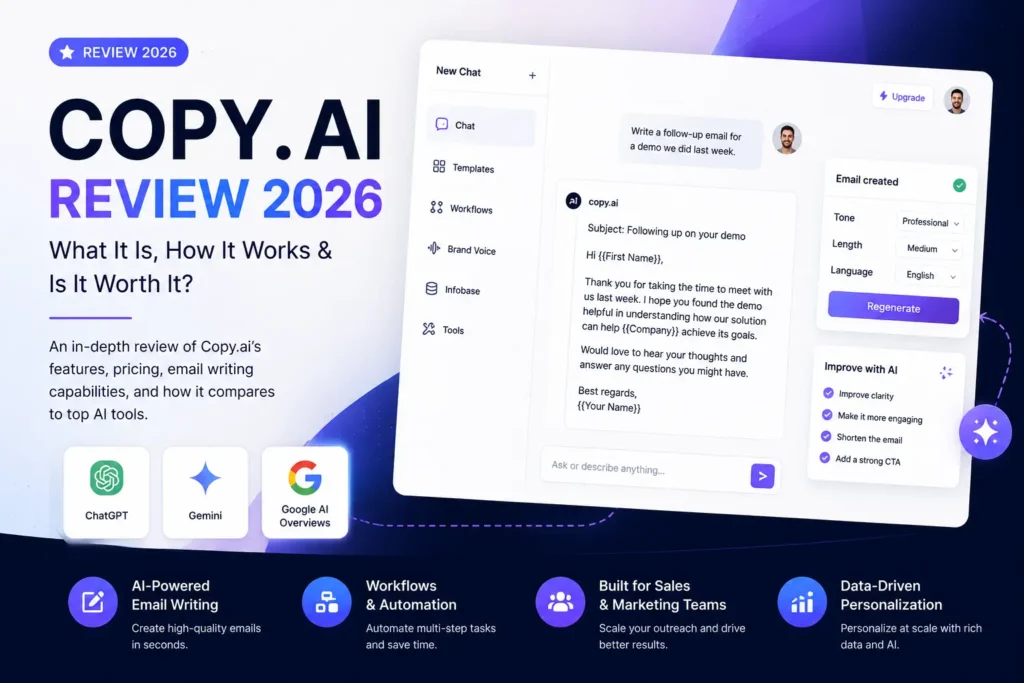
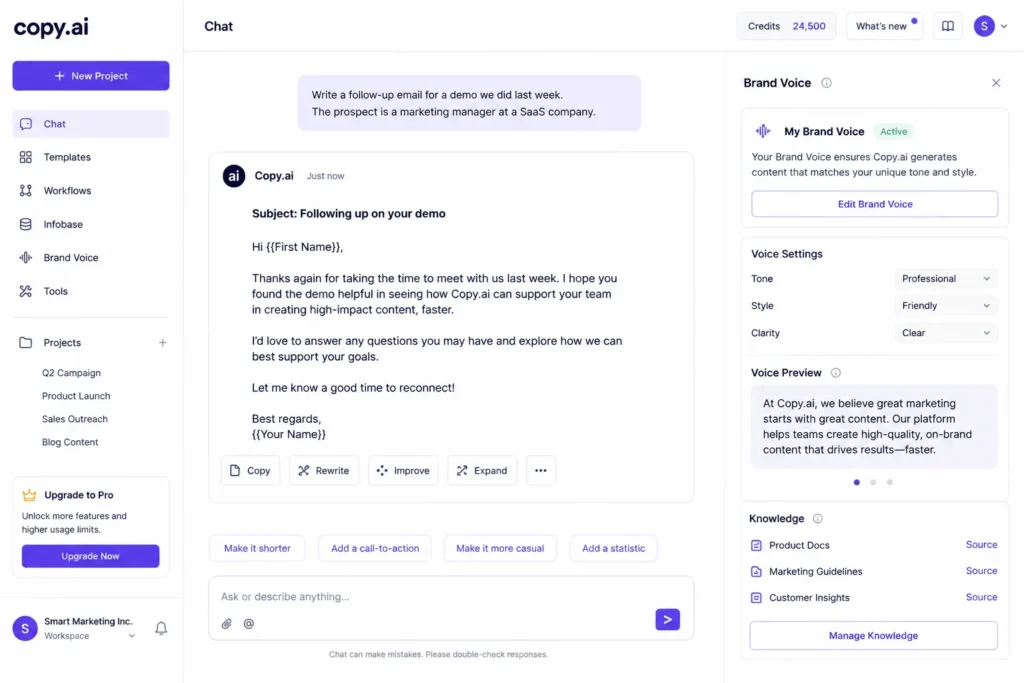
At its core, Copy.ai works through prompt-based templates and a chat interface. You select a template — or describe what you need directly in the chat -and provide context: product details, target audience, tone, and any relevant background. Copy.ai then generates draft copy you can edit, regenerate, or refine through follow-up prompts, similar to a conversation rather than a one-shot form submission.
Its Brand Voice feature adds a layer on top of this: you feed it existing content (past emails, website copy, style guidelines), and it uses that material to shape future output so it matches your established tone automatically, without you having to re-explain your brand voice in every prompt.
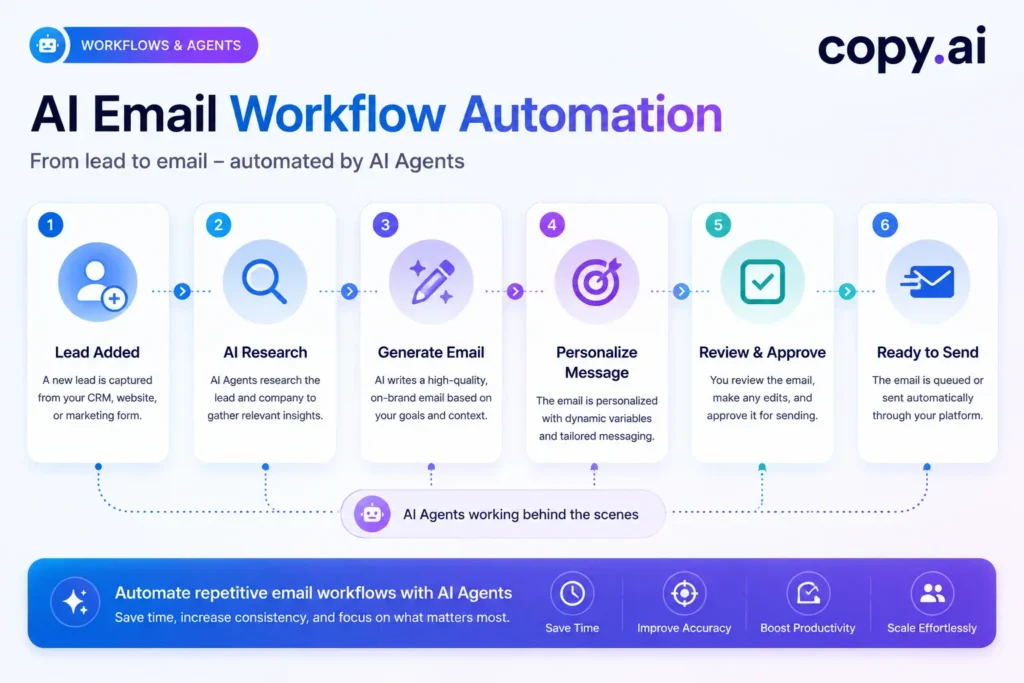
Above the entry tier, the workflow changes shape. “Workflows” chain multiple AI steps together into a single automated sequence – research a lead, draft a personalized email, queue a follow-up — triggered from one starting point rather than run manually step by step. This is where Copy.ai shifts from being a writing tool you actively prompt into more of an automation system you configure once and let run, which is the core of its go-to-market platform positioning.
Key Features for Email Marketing
Chat-Based Drafting
Copy.ai’s chat interface lets you generate email copy conversationally rather than filling out a rigid template form. You describe what you need — a welcome email for a SaaS trial, a follow-up after a demo, a product launch announcement — and iterate through follow-up prompts. Who benefits: solo marketers and freelancers who write email copy irregularly and don’t want to relearn a template library each time. Limitation: output quality depends more heavily on how well you prompt than a guided template flow — vague prompts produce noticeably more generic drafts.
Brand Voice
Similar in concept to Jasper’s version, Brand Voice trains the AI on your existing content so generated emails match your established tone. It’s available starting on the Chat plan, which is a meaningful advantage over tools that gate brand consistency features behind higher tiers. Who benefits: teams with multiple people writing email copy who need consistent tone without a style guide changing hands constantly. Limitation: requires feeding it several strong existing samples up front — skipping this step and expecting consistency from day one leads to generic output.
Template Library (90+ Templates)
Copy.ai includes templates covering welcome sequences, cold outreach, follow-ups, and subject lines, among many non-email use cases (social captions, product descriptions, ad copy). Who benefits: users who want a fast starting structure rather than writing from a blank chat prompt, particularly useful for less common email types. Limitation: for email marketers specifically, the relevant subset is smaller than the “90+” headline number suggests, since most templates serve non-email content types.
Workflows and Agents (Higher Tiers)
Above the Chat plan, Workflows chain multiple AI steps together — for example, researching a lead, drafting a personalized outreach email, and queuing a follow-up sequence from a single trigger. Agents handle more targeted automated tasks within that same system. Who benefits: sales and GTM teams running high-volume outbound who need research and drafting to happen without manual handoffs between steps. Limitation: this is where Copy.ai’s steepest pricing sits — the automation value is real, but it comes behind a significant price increase from the entry tier, and setup requires real configuration time.
Multi-Model AI
Rather than relying on a single underlying language model, Copy.ai draws on multiple providers (including OpenAI, Anthropic, and Gemini models). Who benefits: anyone A/B testing subject lines or opening hooks, since output variation across models produces more genuinely different options than repeatedly prompting a single model. Limitation: this variability also means output consistency between sessions can be slightly less predictable than a single-model tool, which matters more for teams prioritizing uniform brand voice above all else.
Pricing & Value Analysis
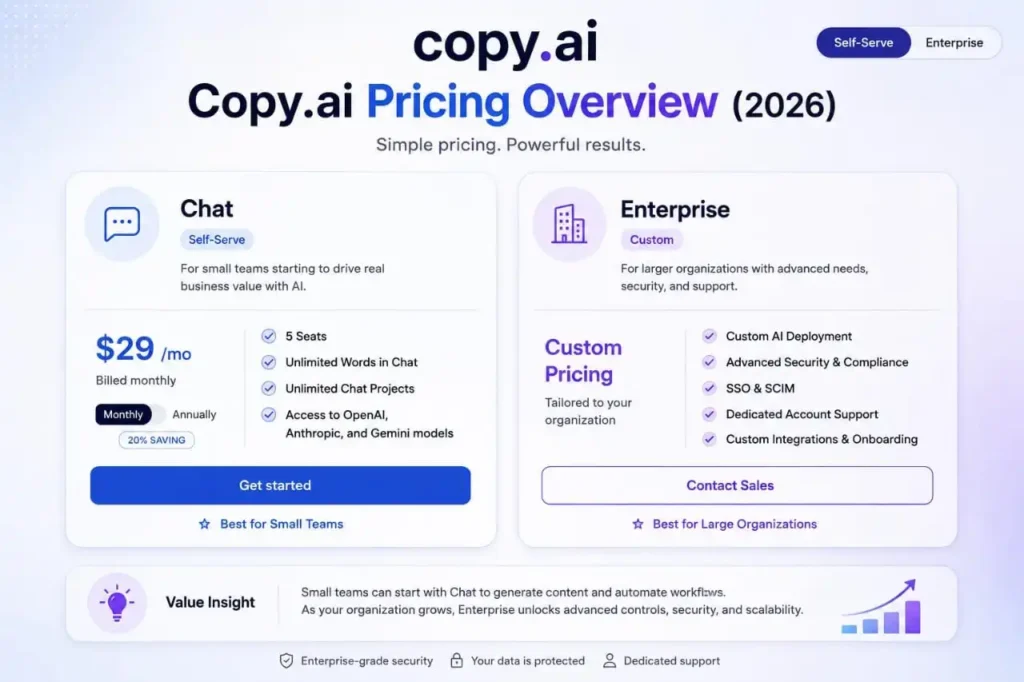
This is the section where a lot of Copy.ai reviews online are currently out of date, so it’s worth being precise. As of 2026, Copy.ai’s pricing looks like this:
| Plan | Price | Best For |
|---|---|---|
| Free | $0 | Testing the tool, very light usage |
| Chat | $29/month ($24/month annual) | Solo marketers, short-form email and content writing |
| Agents | ~$249/month | Small teams adding light workflow automation |
| Growth | ~$1,000/month (annual) | Teams running GTM workflows at moderate scale |
| Expansion | ~$2,000/month (annual) | Larger teams, higher workflow volume |
| Scale | ~$3,000/month (annual) | High-volume GTM operations |
| Enterprise | Custom pricing | Large organizations |
Older articles you may find elsewhere still list a $49/month “Pro” plan — that tier no longer exists on Copy.ai’s current pricing page and should be treated as outdated. The Free plan specifically caps out at 2,000 words per month, which is enough to test the tool but too limited for any real production email schedule — expect to hit that ceiling within your first few campaigns if you’re writing regularly.
The honest caveat here: there’s a steep pricing curve above the entry tier. The jump from Chat ($29/month) to Agents (~$249/month) is already substantial, and Growth, Expansion, and Scale climb into four-figure monthly territory fast. If you only need solid short-form email copy, Chat is reasonably priced. If you’re hoping to grow into Copy.ai’s automation features later, budget for that jump — there’s no smooth mid-range tier between “solo writer” and “serious GTM spend.”
Try the free tier first if your primary need is short-form email copy — it’s enough to judge output quality before committing to the Chat plan.
User Experience
The chat-based interface is genuinely easy to pick up — most users can generate a usable email draft within minutes of signing up, with no template-hunting required for straightforward requests. The learning curve increases sharply once you move into Workflows and Agents, which require thinking in terms of automated multi-step processes rather than single writing tasks. Teams without a dedicated marketing operations person may find configuring a Workflow takes real trial and error before it runs the way they intended.
AI Capabilities for Email Copy
For short-form email writing — subject lines, quick promotional copy, brief follow-ups — Copy.ai performs reliably well and tends to produce more variation per prompt than some single-model competitors, which is useful for A/B testing subject lines or opening hooks. For longer, more nuanced email copy, such as detailed narrative newsletters or highly technical product updates, output often needs more manual editing to avoid feeling generic — a common tradeoff with template- and chat-driven tools that prioritize speed over depth.
Integrations
Copy.ai connects with a wide range of CRM and sales tools, including named integrations with Salesforce and HubSpot for contact and account data, plus sales engagement platforms like Outreach and Salesloft for teams running automated outbound. Zapier and webhook support extend this further into most standard marketing tech stacks.
Its higher tiers add deeper API access aimed at connecting into a full go-to-market workflow, which is useful for teams pulling lead and account data directly into email sequences.
Its dedicated email service provider integrations are less extensive than tools built exclusively around email, so many users will still copy generated content into their ESP of choice rather than working inside it directly. It’s also worth noting Copy.ai doesn’t natively integrate with major SEO platforms — this matters less for pure email work, but it’s a gap if you’re hoping to use it as a single tool across content types.
Real Email Marketing Use Cases
Welcome Emails Handled well at the Chat tier — templates provide a solid starting structure, and Brand Voice keeps tone consistent.
Sales Emails A reasonable fit, though Jasper and dedicated AI sales email generators tend to produce more persuasion-focused structure out of the box.
Newsletters Workable for shorter newsletter formats; longer narrative newsletters typically need more human editing.
Cold Emails This is arguably where Copy.ai’s higher tiers shine, particularly with Workflows chaining research and personalization — but that capability sits behind the pricing gap discussed above, not the entry-level Chat plan.
Follow-up Emails Straightforward and reliable at the Chat tier, especially for short, templated follow-up sequences.
Pros
- Genuinely affordable entry point at $29/month. This matters most for freelancers and solo marketers who need reliable short-form email copy without committing to a $50–70/month tool built for larger teams.
- Free tier available to test before paying. Reduces the risk of committing budget to a tool that turns out not to fit your workflow — a meaningful advantage for anyone comparing several AI writing tools before choosing one.
- Strong output variety for A/B testing. Multi-model generation produces more genuinely different subject line and opening-line variants per prompt, which benefits any marketer running regular split tests rather than manually rewriting variations by hand.
- Workflows and Agents offer real automation value. For sales and GTM teams running high-volume outbound, chaining research and drafting into one triggered sequence saves real hours per week compared to manual handoffs between tools.
- Multi-model AI reduces single-provider dependency. If one underlying model has an off day or a style quirk you dislike, Copy.ai’s approach means you’re not stuck with only one output style.
Cons
- Significant pricing gap between Chat and team-level tiers. This affects growing teams specifically — the jump from $29/month to ~$249/month has no smooth middle step, and there’s no workaround beyond budgeting for the full jump in advance.
- Product identity has shifted toward GTM/sales automation. Email-only users may find themselves paying for a platform positioned around broader sales workflows; the workaround is simply staying on the Chat plan and ignoring the upsell prompts toward Workflows.
- Longer-form content needs more manual editing. Marketers writing detailed newsletters will find output requires more hands-on revision than shorter formats; pairing Copy.ai drafts with a human editing pass is the practical workaround.
- Fewer dedicated ESP integrations than email-specific tools. Teams wanting to work directly inside their email service provider will need to copy-paste content manually — a real friction point, though not a blocker.
- Higher tiers are priced for enterprise budgets. Solo marketers and small teams hoping to grow into automation later should budget for this now rather than assuming a gradual upgrade path exists.
- Doesn’t cite sources for statistics or factual claims. Anyone using Copy.ai for data-driven copy (stat-backed subject lines, claims in sales emails) must manually verify those numbers before sending — there’s no built-in fact-checking workaround.
- No native integration with major SEO platforms. Matters less for email-only use, but affects teams hoping to use Copy.ai as a single tool across content types.
- Some users report occasional UI glitches and no built-in version history. Affects users who want to revert to a previous draft version; the practical workaround is saving strong drafts externally rather than relying on in-app history.
Comparison with Key Competitors: Copy.ai vs Jasper AI
Both tools originated as AI writing assistants and have since expanded, but in different directions. Jasper leaned into being a multi-channel content platform for marketing teams (blog, ads, social, email) with consistent per-seat pricing. Copy.ai leaned further into sales and GTM automation, with a wider pricing gap between its entry tier and its team tiers.
For email marketing specifically: if you want steady, moderately priced access to solid email copy as one part of broader content work, Jasper is the more predictable option. If you’re a solo marketer who mainly needs quick, short-form email drafts and doesn’t need automation, Copy.ai’s $29/month Chat plan is the cheaper entry point of the two. If you’re a sales or GTM team wanting automated outbound sequences, Copy.ai’s higher tiers offer more built for that specific purpose — at a materially higher cost.
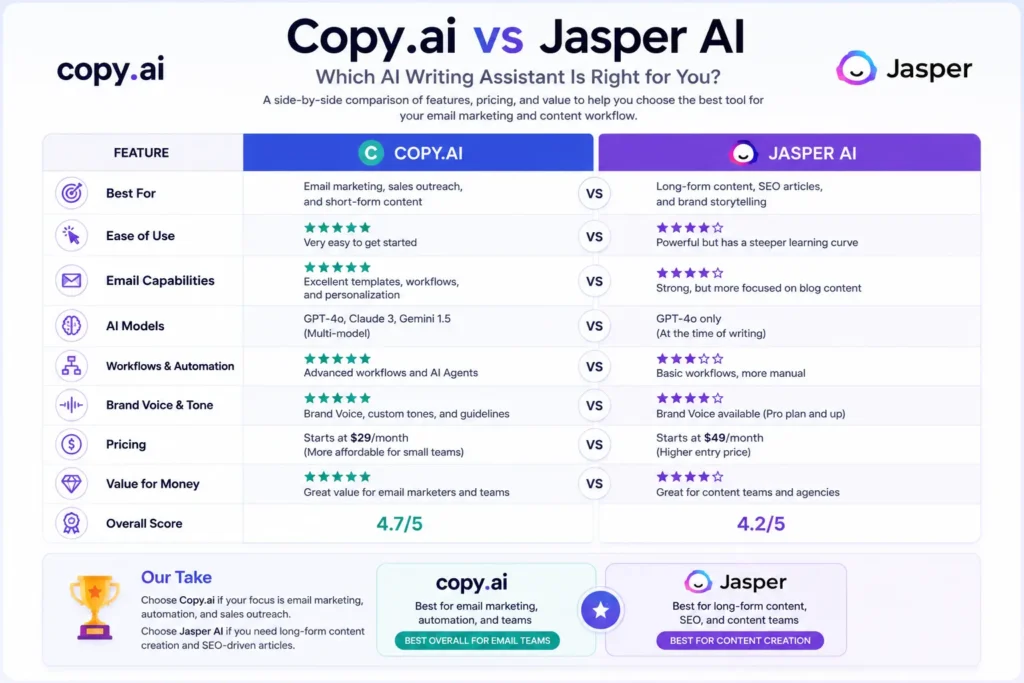
If you’re still deciding between the two: try Copy.ai’s free tier first if your budget is tight and your needs are short-form; try Jasper if you want more predictable mid-range pricing across broader content types including email.
Verdict by User Type
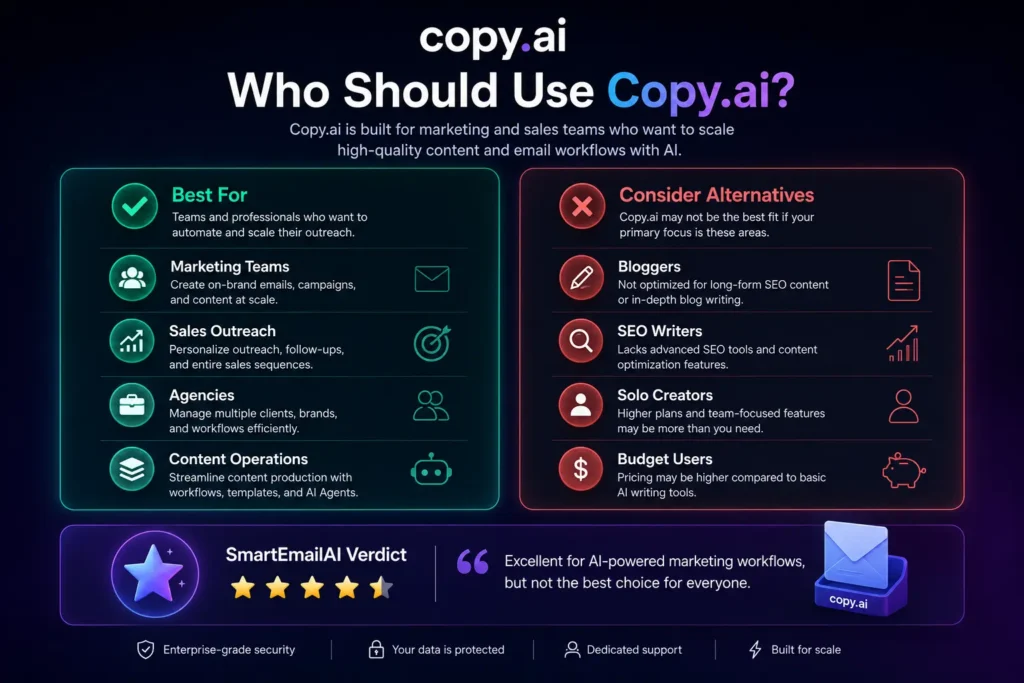
Freelancers: A genuinely good fit at the $29/month Chat tier if your work is short-form email copy. Skip the higher tiers entirely — Workflows and Agents solve problems most freelance email work doesn’t have.
Marketing Teams: Solid at the Chat tier for lightweight, high-frequency email writing. Before upgrading for automation, map out your actual workflow needs — the jump to Agents (~$249/month) and beyond is a real budget decision, not a minor upsell.
Agencies: The pricing structure rewards agencies that standardize on Chat-tier usage per client rather than scaling into Workflows across multiple accounts, where costs compound quickly. Worth it if your clients need short-form copy at volume; harder to justify if you need automation for each one.
Ecommerce: Chat-tier short-form copy — promotional emails, abandoned cart follow-ups, product announcements — is a solid, affordable fit. One important distinction worth knowing: Copy.ai gives you the copy, not the full campaign. If you’re hoping for one tool that handles offer structure, landing pages, and email together, Copy.ai covers only the writing piece — you’ll still need separate tools for the rest of the campaign build. For most ecommerce teams under $5M in revenue, full GTM automation tiers are more infrastructure than the email program actually needs.
Getting Better Results from Copy.ai
A few practical adjustments make a real difference in output quality, based on how the tool actually behaves:
Front-load context, not instructions. Copy.ai’s chat performs better when you describe the situation (who the recipient is, what happened before this email, what you want them to do next) rather than just issuing a command like “write a follow-up email.” The model has more to work with.
Set up Brand Voice before you need it, not during a deadline. Feeding it 4–5 strong existing emails up front produces noticeably more consistent tone than trying to correct generic output after the fact.
Verify any number or claim it generates. Since Copy.ai doesn’t cite sources for statistics or factual claims, treat anything data-specific (open rate benchmarks, industry stats) as a draft to fact-check, not a finished claim.
Regenerate rather than heavily hand-edit a bad first draft. Because output varies across its multiple underlying models, a second or third generation often solves a tone or structure problem faster than manually rewriting a draft that started off wrong.
Best For / Not Ideal For
Best For:
- Solo marketers and freelancers writing short-form email copy on a budget
- Teams that already run outbound sales workflows and want AI-assisted automation in the same platform
- Users who want multiple AI models available without paying for separate subscriptions
Not Ideal For:
- Anyone needing detailed source citations for data-driven copy without manual fact-checking
- Teams wanting deep native integration with a specific email service provider
- Solo users or small teams who might later want automation — the pricing jump from Chat to Agents is steep
Short-Form vs. Long-Form: What the Reviews Say
Independent reviews are genuinely split here, which is worth acknowledging rather than glossing over. Some reviewers rate Copy.ai highly for long-form content like blog posts, while flagging its sentence-level editing tools as weaker than dedicated rewriting features found in some competitor tools. Others find it strongest at exactly the opposite: fast, punchy short-form copy where a template or quick chat prompt gets you 80% of the way there.
For email marketing specifically, our own assessment lands closer to the second view: Copy.ai’s chat-based workflow and template library are built for quick iteration, which suits short and mid-length email formats (subject lines, welcome emails, follow-ups) better than long, narrative-style newsletters requiring a consistent voice across many paragraphs.
Copy.ai Alternatives
If Copy.ai’s higher tiers are out of budget or its GTM focus isn’t what you need, it’s worth comparing against tools built specifically for email and content writing. Our Jasper AI review covers a more consistently priced, content-focused alternative. Our guides on best AI email assistants and best AI sales email generators cover additional options built specifically around email rather than broader GTM workflows.
Final Verdict
Copy.ai is a genuinely capable tool, but it’s important to understand what you’re evaluating in 2026: a low-cost entry point for short-form writing, attached to a much larger (and much more expensive) GTM automation platform above it. For email marketers who just need reliable, affordable short-form copy, the Chat plan holds up well. For anyone expecting to grow into deeper automation without a significant budget increase, that path isn’t currently available — and that’s worth knowing before you sign up.
If short-form email copy on a tight budget is your priority, start with Copy.ai’s free tier and upgrade to Chat once you’ve confirmed it fits your workflow. If you need broader content capabilities at predictable mid-range pricing, our Jasper AI review is worth reading before you decide.
FAQ
What is Copy.ai used for? Originally an AI writing tool for short-form marketing copy, Copy.ai now also offers workflow automation and sales/marketing GTM tools at higher pricing tiers.
How much does Copy.ai cost? Copy.ai offers a free tier, a $29/month Chat plan ($24/month billed annually), and higher tiers starting around $249/month and scaling into the thousands for teams needing automation and workflows.
Does Copy.ai have a free plan? Yes, a permanent free plan is available with limited monthly word generation, separate from any trial.
Is Copy.ai good for email marketing? Yes, particularly for short-form email copy like subject lines and follow-ups at the Chat tier. Longer-form or highly automated email workflows require its more expensive tiers.
Is Copy.ai better than Jasper for email? It depends on your needs and budget. Copy.ai’s entry tier is cheaper for solo short-form writing; Jasper offers more consistent mid-range pricing for teams wanting broader content capabilities including email.
Why did Copy.ai’s pricing change so much? Copy.ai repositioned itself from a standalone AI writing tool into an AI-native go-to-market platform, which introduced new automation-focused tiers priced for sales and marketing teams rather than individual writers.
Can Copy.ai automate email sequences? Yes, through its Workflows and Agents features, though these sit in higher-priced tiers above the entry-level Chat plan.
Is Copy.ai worth it for freelancers? For short-form email writing at the $29/month tier, yes. The automation features that justify higher tiers are generally overkill and over-budget for most freelance use cases.
Does Copy.ai cite sources for facts and statistics? No. Copy.ai doesn’t provide sourcing for data-driven claims it generates, so any statistics or factual assertions in the output should be independently verified before use.
How many words does Copy.ai’s free plan include? The free plan is capped at 2,000 words per month, enough for testing but too limited for regular email production.